

Think of a SQL Server data page as a Delta carry-on suitcase. It is always the same size, 8 kilobytes. When people talk about making SQL Server fast, they usually focus on queries or hardware. But how you pack your data into these 8 KB suitcases has a big impact on performance, storage, and even cost.
The Carry-On Suitcase Problem
An 8 KB suitcase might seem big, but there is a catch.
The Must-Pack Items (Page Header)
The first 96 bytes of every page are reserved for the Page Header. Think of it like your camera or laptop when you travel. You cannot leave it behind, and it always takes up space. The Page Header stores important information such as the page ID and the number of rows.
The Usable Space
That leaves 8,096 bytes for your actual data.
Small Inefficiency, Big Problem
If you have millions of these suitcases, those 96 bytes add up to gigabytes of wasted space. Just like paying for extra baggage on Delta, inefficient packing forces SQL Server to burn more memory and perform more I/O to store the exact same data.
And this is where the type of “packing strategy” you choose matters a lot.
How Data Fits Inside the Suitcase
After the 96-byte must-pack items, your row data goes in. But there is more to consider.
| Component | What It Means |
| Fixed Data | Columns with predictable sizes like INT or DATETIME. Easy to pack efficiently. |
| Variable Data | Columns that change size like VARCHAR. SQL Server tracks the length, which adds extra bytes, like squeezing souvenirs into your bag. |
| Row Pointers (The Map) | SQL Server stores pointers showing where each row starts. Each row adds 2 bytes, similar to adding packing dividers to keep things organized. |
Even NULLable columns add overhead. If your table has 10 columns that could be NULL, each row still carries metadata even if most columns stay empty. That means fewer rows fit per page. It is like trying to pack more items in your carry-on but hitting the weight or space limit faster than expected.
Data Types Do Matter
I once came across a table that I just knew was tied to performance issues. I couldn’t figure out why at first, but after looking for a bit I found the City column was created as CHAR instead of VARCHAR.
This is the classic over-packing mistake. Everyone has that friend who fills their suitcase so much they need to sit on it to zip it. In SQL Server, that friend is the person who uses CHAR when they should use VARCHAR.
Why CHAR Can Be a Problem
- CHAR always uses the full space even if the actual value is tiny.
- For example, storing “UT” in a CHAR(50) column still consumes 50 bytes.
That’s the friend who packs a winter coat for a trip to Hawaii.
Demonstration Script CHAR vs VARCHAR for Small Values
To see the difference in action, I ran a simple test using two tables:
- dbo.CharTest using CHAR(50) for the Name column
- dbo.VarTest using VARCHAR(50) for the Name column
I inserted the same small value (‘UT’) into both tables and measured storage.
Expand code.
-- Clean test environment
DROP TABLE IF EXISTS dbo.CharTest;
DROP TABLE IF EXISTS dbo.VarTest;
GO

-- Table using CHAR
CREATE TABLE dbo.CharTest
(
    ID INT IDENTITY(1,1),
    Name CHAR(50)
);
GO

-- Table using VARCHAR
CREATE TABLE dbo.VarTest
(
    ID INT IDENTITY(1,1),
    Name VARCHAR(50)
);
GO

-- Insert a single value
INSERT INTO dbo.CharTest (Name) VALUES ('UT');
INSERT INTO dbo.VarTest (Name) VALUES ('UT');
GO

-- Show actual bytes stored per row
SELECT TOP 10
    'CHAR' AS TypeUsed,
    Name,
    DATALENGTH(Name) AS BytesUsed
FROM dbo.CharTest;

SELECT TOP 10
    'VARCHAR' AS TypeUsed,
    Name,
    DATALENGTH(Name) AS BytesUsed
FROM dbo.VarTest;

-- Show page usage
SELECT
    OBJECT_NAME(object_id) AS TableName,
    index_type_desc,
    alloc_unit_type_desc,
    page_count,
    avg_page_space_used_in_percent
FROM sys.dm_db_index_physical_stats(
    DB_ID(),
    OBJECT_ID('dbo.CharTest'),
    NULL,
    NULL,
    'DETAILED'
);

SELECT
    OBJECT_NAME(object_id) AS TableName,
    index_type_desc,
    alloc_unit_type_desc,
    page_count,
    avg_page_space_used_in_percent
FROM sys.dm_db_index_physical_stats(
    DB_ID(),
    OBJECT_ID('dbo.VarTest'),
    NULL,
    NULL,
    'DETAILED'
);
GO
The Results
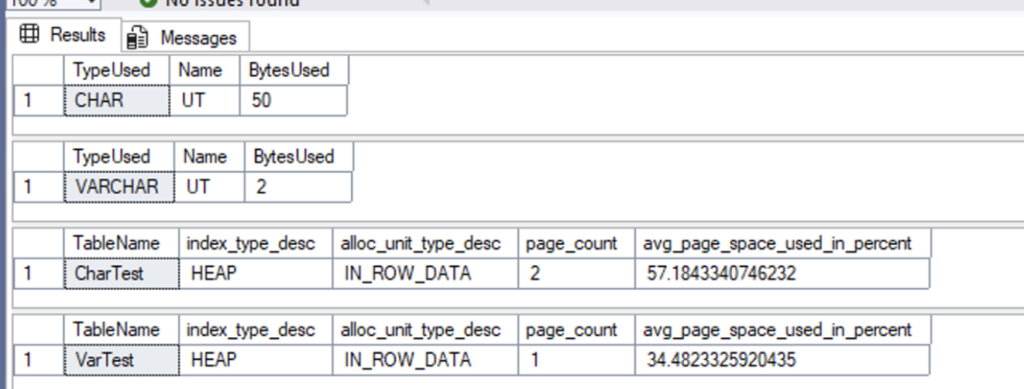
Row-Level Storage
- CHAR(50) always stores 50 bytes per row, even for small values like ‘UT’.
- VARCHAR(50) stores only the bytes needed for the value plus 2 bytes for length. ‘UT’ in VARCHAR(50) uses 4 bytes (2 for the string + 2 for length).
Page-Level Storage
- The CHAR table uses more pages because each row takes up more space, resulting in lower page density.
- The VARCHAR table fits more rows per page, so it uses fewer pages.
- Even small over-packing adds up across millions of rows, increasing memory usage, I/O, and cloud costs.
Using VARCHAR Efficiently
VARCHAR only uses the space it needs plus 2 bytes for length.
- Example: storing ‘UT’ in VARCHAR(50) → 2 bytes (length) + 2 bytes (value) = 4 bytes, instead of 50.
- This “smart packing” fits more rows per page, lowers I/O, and improves performance.
Why CHAR Appears to Show Two Rows
sys.dm_db_index_physical_stats reports each allocation unit separately:
IN_ROW_DATA
Normal row data that fits within 8,060 bytes
ROW_OVERFLOW_DATA
Only used when a single row exceeds 8,060 bytes
LOB_DATA
For large objects like TEXT, VARCHAR(MAX), or NVARCHAR(MAX)
Most small tables only use IN_ROW_DATA, which is why VARCHAR tables typically show a single row.
For the CHAR(50) table:
- Each row reserves the full fixed length, even if the actual data is tiny.
- This reduces page density and increases the number of pages needed to store the same data.
- The “two rows” you see in
sys.dm_db_index_physical_statssimply reflect that SQL Server reports multiple pages or internal storage structures.
Over Packing Tips
- CHAR wastes space due to its fixed length.
- VARCHAR packs efficiently, fitting more rows per page and improving both performance and storage costs.
Demonstration of What Happens When CHAR EXCEEDS 8,060 Bytes
Unlike VARCHAR, CHAR cannot exceed the in-row limit of 8,060 bytes.
Expand code here
-- Clean test environment

DROP TABLE IF EXISTS dbo.CharOverflow;

-- Table using CHAR to exceed 8,060 bytes

CREATE TABLE dbo.CharOverflow

(

    ID INT IDENTITY(1,1) PRIMARY KEY,

    BigCol CHAR(8100)  -- exceeds in-row limit

);

-- Attempt to insert a row

INSERT INTO dbo.CharOverflow (BigCol)

VALUES (REPLICATE('A', 8100));

Results
The Results
Attempting to do so will result in an error:

CHAR cannot exceed the 8,060-byte in-row limit.
Attempting this causes an error, SQL Server cannot store extra fixed-length bytes off-page.
The Consequences
Using CHAR unnecessarily leads to:
- More pages
- More internal structures
- Lower page density
- Has limitations
…all for the exact same data.
This is the storage equivalent of forcing the airline to check an extra bag because you packed bulky items you didn’t need. VARCHAR packs efficiently, uses fewer pages, and avoids the overhead completely.
The FinOps Impact
This isn’t just about speed or I/O. Byte-level waste translates into billing-level waste in cloud environments:
- More pages = more storage
- More I/O = higher compute and memory usage
- Extra internal structures = more overhead
Using CHAR across millions of rows can push you into a higher storage tier or force a larger, more expensive instance. Smart data types = smart costs.
You are just paying more for a bigger suitcase instead of packing smarter.
Why DBAs Must Understand Pages
Understanding the 8 KB suitcase is the key to designing high-performance SQL Server systems. It lets you prevent problems instead of paying “extra baggage fees” in memory, I/O, and slow queries.
Memory (Buffer Pool)
The buffer pool is like the overhead bin on a plane. It holds your hot pages.
If your rows are bulky because of wide or fixed data types, SQL Server needs more pages to store the same data. More pages mean more memory pressure and more churn.
Query Speed (I/O Reads)
SQL Server reads data page by page.
If 1,000 rows take 10 pages instead of 5, your query doubles its I/O cost.
More reads → slower performance.
This is waiting at baggage claim because you brought too much stuff.
Fragmentation (Page Splits)
Wide rows create wide indexes. When a page fills, and SQL Server must insert another row, it splits the page.
This is the SQL version of opening your suitcase in the boarding line and repacking it in front of everyone.
The Big Takeaway
Think like a smart traveler:
- Pack efficiently.
- Choose the right data types.
- Avoid CHAR unless you need fixed length.
- Keep variable columns under control.
- Design tables with page density in mind.
The reward is less memory usage, faster queries, reduced I/O, lower cloud spend, and a SQL Server that runs smoothly without paying extra baggage fees.
Leave a Reply